
Download Train — Customer Education Platform for SaaS, On‑boarding, and Retention
Overview of Train
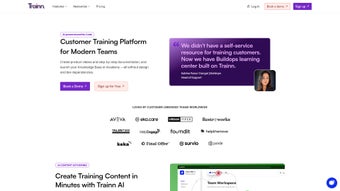
Train is a modern, web‑based Customer Education Platform built specifically for SaaS companies that want to accelerate product adoption, improve user competency, and keep churn rates low. Delivered as a fully managed, subscription‑based service, Train combines a powerful no‑code course builder, a feature‑rich Learning Management System (LMS), and a self‑serve Knowledge Hub—all housed in a secure, GDPR‑compliant cloud environment. The platform lets you design interactive learning experiences without writing a single line of code, making it possible for product managers, support teams, and marketers to publish training content quickly and iterate based on real‑time feedback.
Beyond the core training engine, Train offers a searchable help center, a best‑practice blog, and a curated Knowledge Base that can be embedded directly into your product UI. This ensures that customers, partners, and internal staff always have the right information at the right moment, whether they are onboarding for the first time or seeking advanced tips after months of usage. By centralising all education assets and tracking learner progress, Train provides actionable insights that link learning outcomes to key business metrics such as Net Promoter Score (NPS), renewal rates, and average revenue per user (ARPU). The platform’s flexible architecture scales with your roadmap, allowing you to add new courses, certifications, or language localisations as your product evolves.
Because Train is built on a cloud‑native stack, security updates, performance optimisations, and new feature releases are applied automatically, eliminating the need for manual patching or on‑premises maintenance. This “set‑and‑forget” model frees your IT resources to focus on strategic initiatives rather than routine upkeep, while your learners benefit from a fast, reliable, and always‑up‑to‑date learning environment.
Key Features & Integrated LMS
Train’s feature set is designed to address the entire learning lifecycle—from content creation to performance reporting. The platform’s intuitive drag‑and‑drop builder lets you assemble video lessons, voice‑over tutorials, PDFs, and interactive quizzes in minutes. Each module can be enriched with branching scenarios, knowledge checks, and certification pathways that automatically award digital badges when learners meet predefined criteria. The integrated LMS acts as the central hub where administrators organise courses into hierarchical tracks, assign learners based on subscription tier or behavioural triggers, and schedule recurring training sessions. Real‑time notifications keep users informed about new content, while built‑in SCORM compatibility ensures you can import legacy e‑learning assets without rebuilding them from scratch.
- No‑code Course Builder: Drag‑and‑drop interface to create video lessons, voice‑over tutorials, PDFs, and interactive modules without developers.
- Video Hosting with Voiceovers: Upload raw footage, add professional voice‑overs, and publish directly to the platform.
- Interactive Quizzes & Assessments: Multiple‑choice, drag‑and‑drop, and scenario‑based questions that feed into real‑time scoring.
- Certification Engine: Issue digital certificates automatically when learners meet predefined criteria.
- Partner & Sales Enablement Tracks: Separate learning paths for channel partners and internal sales teams, complete with role‑based access.
- Self‑Serve Knowledge Hub: A searchable help center, video library, and blog that can be embedded in your product UI.
- Analytics Dashboard: Track course completion, quiz scores, time‑on‑module, and correlate learning metrics with product usage.
- Multi‑language Support: Create localized content for global audiences with automatic language fallback.
- Secure Cloud Hosting: GDPR‑compliant data storage, SSL encryption, and role‑based permissions.
- API & Webhooks: Integrate Train with your CRM, support ticket system, or product telemetry for a unified experience.
The LMS also provides granular reporting capabilities, allowing you to slice data by department, region, or product version. These insights can be exported to CSV for deeper analysis or fed directly into BI tools via API. For heavily regulated industries such as fintech or healthtech, every learner action is logged in an audit‑ready manner, simplifying compliance reporting and external audits. By unifying the LMS with the Knowledge Hub, Train eliminates the need for separate knowledge‑base software, reducing both cost and operational overhead while delivering a seamless experience for end users.
Installation, Usage Instructions, and Compatibility
Because Train is a fully cloud‑hosted solution, there is no traditional installation process on the end‑user side. Getting started involves three simple steps that can be completed in under ten minutes:
- Sign up for a subscription: Choose a plan that matches your team size and feature needs. A 14‑day free trial with full access to core modules is available for evaluation.
- Configure your workspace: After account creation, log in to the admin console. From there you can set up branding (logo, colour scheme), define user roles (Admin, Trainer, Learner), and connect single‑sign‑on (SSO) providers such as Okta, Azure AD, or Google Workspace.
- Create your first course: Use the no‑code builder to upload videos, add voice‑over narration, embed PDFs, and design quizzes. Publish the course and assign it to a user group or a dynamic segment based on product usage patterns.
Once your courses are live, learners access them through a responsive web portal that works on any modern browser. For organisations that prefer a native‑like experience, Train offers Progressive Web App (PWA) shortcuts that can be added to desktop or mobile home screens, delivering an app‑like feel without the need for App Store distribution. The platform also supports deep linking, enabling you to embed direct course URLs inside in‑product tooltips, onboarding wizards, or email campaigns.
Supported Operating Systems
Since Train is browser‑based, it is compatible with all major operating systems and devices, ensuring that your audience can learn from anywhere:
- Windows 10, 11 (any edition)
- macOS Monterey and later
- Linux distributions with a recent Chromium‑based browser
- iOS 14+ and iPadOS 14+ (Safari or Chrome)
- Android 9+ (Chrome or Firefox)
Security‑focused teams will appreciate that Train enforces TLS 1.2+ encryption, supports Content Security Policy (CSP) headers, and offers IP‑allowlist controls for admin access. Regular automatic updates keep the platform aligned with the latest browser standards and security patches, so you never have to manually download or install a new version.
Pros and Cons
Below is a balanced view of Train’s strengths and areas where organisations may need to consider additional planning. Understanding both sides helps you decide whether the platform fits your short‑term budget and long‑term growth strategy.
- Pros:
- Zero‑code course creation speeds time‑to‑value.
- All‑in‑one LMS + Knowledge Hub reduces tool sprawl.
- Robust analytics tie learning outcomes to product adoption.
- Multi‑language and SCORM support for global teams.
- Secure, GDPR‑compliant cloud hosting with automatic updates.
- Extensive API library enables deep integration with existing tech stacks.
- Progressive Web App shortcuts provide native‑like access without app store hurdles.
- Cons:
- Subscription pricing may be high for very small startups or solo founders.
- Advanced UI customisation (e.g., full white‑label branding) requires developer assistance via API.
- No offline desktop client; reliance on internet connectivity can be limiting for field teams with poor coverage.
- Learning curve for administrators unfamiliar with LMS terminology, though extensive onboarding resources mitigate this.
Frequently Asked Questions
Below you’ll find answers to the most common questions we receive from SaaS leaders, product managers, and training administrators considering Train for their customer education initiatives.
Is Train suitable for non‑SaaS companies?
Yes. While Train is optimised for SaaS product adoption, its LMS and Knowledge Hub can be used by any organisation that needs to deliver structured training—e.g., manufacturing, education, or professional services.
Can I import existing e‑learning content?
Train supports SCORM 1.2 and 2004 packages, allowing you to upload legacy courses directly into the platform without rebuilding them.
What kind of analytics does Train provide?
The analytics dashboard shows course completion rates, quiz scores, average time spent per module, and correlation charts that map learning progress to product usage metrics such as login frequency or feature activation.
Is there a free trial, and how long does it last?
Train offers a 14‑day free trial with full access to all core features. No credit card is required to start the trial.
How does Train handle data privacy and compliance?
All data is stored in GDPR‑compliant data centres with encryption at rest and in transit. Train also provides data‑export tools and audit logs to meet SOX, HIPAA, and other regulatory requirements.
Conclusion – Is Train the Right Choice for Your SaaS Business?
Train delivers a comprehensive, no‑code solution that unifies customer education, partner onboarding, and sales enablement under a single, secure cloud platform. Its powerful LMS, coupled with a searchable Knowledge Hub, enables SaaS companies to accelerate product adoption, reduce churn, and turn support tickets into proactive learning moments. While the subscription cost may be a consideration for early‑stage startups, the time saved on content creation, the depth of analytics, and the compliance‑ready infrastructure make Train a strategic investment for growing SaaS organisations.
If you’re ready to shift from reactive support to proactive education, now is the perfect time to test Train’s capabilities. Sign up for the free 14‑day trial, explore the no‑code builder, and experience firsthand how a unified learning ecosystem can lift user engagement, improve NPS, and drive revenue growth.



.png)



